CLEAR CACHE STEPS
DO NOT DELETE THE APP
Your Favorites are still on your phone, but if you delete the app, they will be permanently removed and we will be unable to restore them. DO NOT delete the app.
WHAT HAPPENED
We found during our investigation that for long-time users of our app, some rows in the underlying database on the device had become corrupted. When the new app was installed, a migration of Favorites from the old app to the new app failed due to these corrupted rows.
NOT ALL FAVORITES WILL RESTORE
Because there is no way for us to restore the corrupted rows, we will not be able to restore those. Testers have seen the restoration of about 90-96% of their lost Favorites.
In addition, any NEW Favorites you have saved since updating will not be preserved due to the nature of the fix; we encourage you to export any before starting the migration.
RESTORE STEPS
Built in Flutter, allowing us to update both operating systems more quickly and efficiently
New interface: All new UI update that looks the same in both iOS and Android (the previous apps for iOS and Android had different interfaces)
Podcasts are now in the app!
Dark mode
Much improved livestreaming
Improved CarPlay and Android Auto experiences
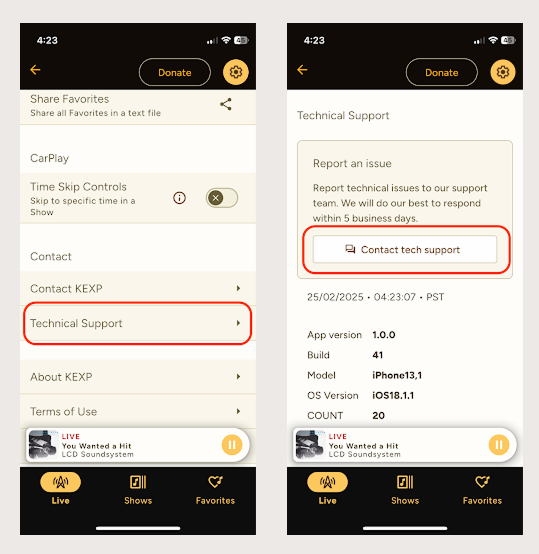
In-app submission for bugs/issues/enhancements
Easier communication to KEXP
On your iOS device, open the TestFlight app
Tap on “KEXP”
Scroll down until you see “Stop Testing” and tap
Confirm by tapping “Stop Testing”
You will now be removed. Thank you for your help!
From the KEXP app, export your Favorites if you would like to preserve them
Delete the KEXP app from your device
Find the KEXP app on the Google Play Store
Scroll down and look for "You're a beta tester". Tap the "Leave" link.
If you do not see the "You're a beta tester section, remove yourself from the original URL: https://play.google.com/apps/testing/org.kexp.android
Wait about 30 minutes, then close and restart the Google Play Store app. You should notice the "Beta" is not displayed next to the "KEXP" header anymore
Install the app back onto your device. Thank you for your help!
Have a mobile app bug, feedback or feature to report? Reach out in the mobile app under Settings >Technical Support and send us a message. You can also reach us through our Listener Services Portal.